
01
Plan your month
Compare planned and actual amounts across three income sources and twelve living-cost and savings categories. Totals and differences update as you enter your figures.
Personal finance · Six colorways
Make room for a clearer month. Bring your income, spending, savings, and debt payments into one thoughtfully designed workbook.
The complete colorway bundle
Coming soon
Preview the workbook below. Pricing and purchase details will be posted when the bundle is ready.
Ask about this templateDigital spreadsheet files · No physical item
Choose a look to preview. Every colorway has the same features, and all six come in the bundle.
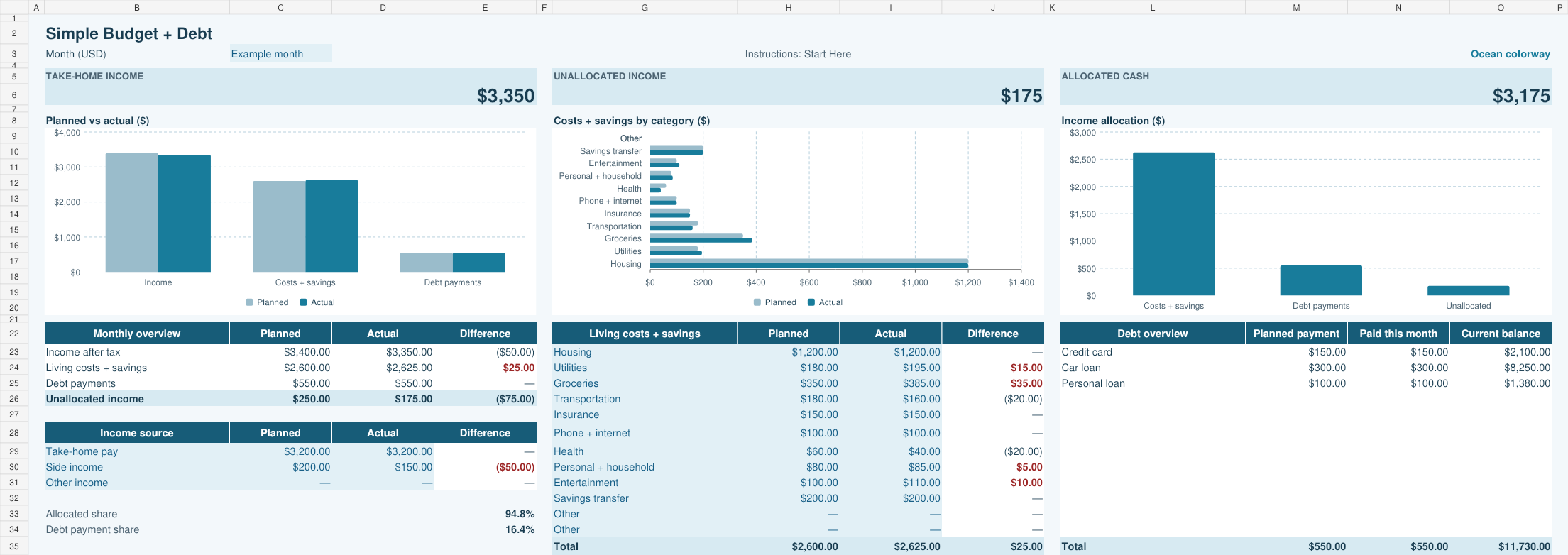
Preview amounts are fictional examples in USD. For a closer look on a small screen, open the full-size preview.
What’s inside
01
Compare planned and actual amounts across three income sources and twelve living-cost and savings categories. Totals and differences update as you enter your figures.
02
Track up to twelve debts, planned payments, paid amounts, and statement balances. Payment totals flow into the budget, with a starting-versus-current-balance chart beside your accounts.
03
Three budget charts show planned versus actual totals, costs by category, and income allocation. The Start Here tab keeps instructions separate from your daily workspace.
Six .xlsx workbooks: Ocean, Forest, Rose, Warm Sand, Dark Lavender, and High Contrast Ocean. Each includes Monthly Budget, Debt Tracker, and Start Here tabs with the same calculations and features. A read-me file is also included.
The workbooks have been verified in LibreOffice Calc. Direct testing in Microsoft Excel and Google Sheets is still pending, so compatibility with those apps is not yet confirmed. This page will be updated as testing is completed.
Payment totals feed into the monthly budget automatically. Update each current balance yourself using your latest statement. The tracker does not calculate interest or payoff dates.
Save a new monthly copy. Keep your plans, debt names, and starting balances; clear actual income and living costs, reset paid-this-month amounts, refresh current balances, and change the month label. The Start Here tab walks you through it. There is no automatic annual rollup.
No bank connection or macros are required. You enter your own amounts into the tinted cells. Formulas are editable and are not locked, so keep an untouched copy of the original workbook.
The layout is designed for desktop spreadsheet use. Smaller screens may need zooming or scrolling. The previews show fictional examples in USD; replace those examples with your own entries before using the workbook.
Ask Matt about the features or how the template fits your routine.